Photo to cartoon: cartoonize any photo in flat, comic or storybook style
Turn any picture into a cartoon in your browser: Image to Image AI's photo to cartoon tool redraws a portrait, pet or everyday scene as an illustration. Pick a cartoon direction, generate a new version, and compare how the AI interprets the shapes and colors.
2 free credits for new verified accounts
From 1 credit per generation
Compare every version
Private by default
Real exampleSAVED EXAMPLE
BEFORESAVED AI RESULT
Saved example · gpt-image-2. Drag the slider to compare. Upload your own photo to try your settings.
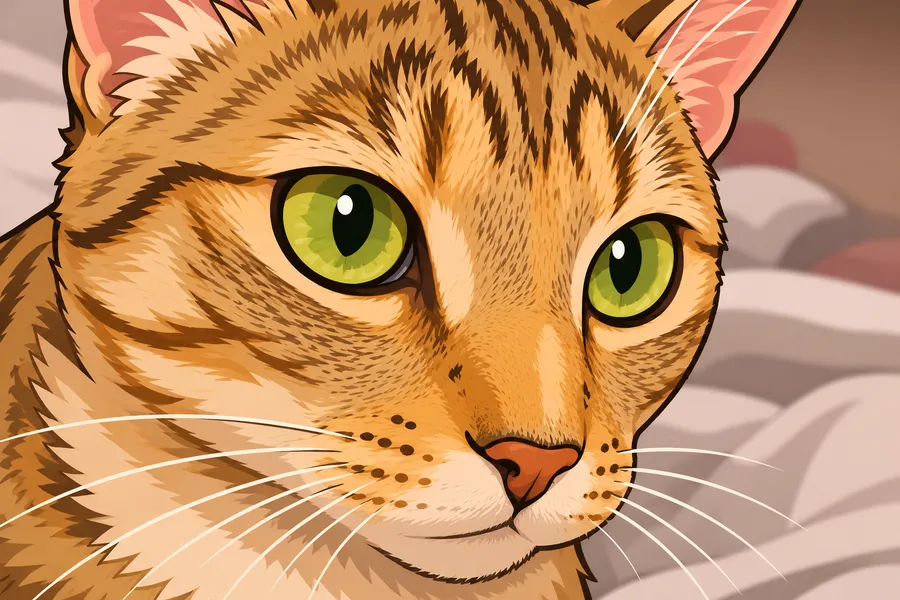
Transform this photo into a colorful 2D cartoon illustration. Preserve the main subject, proportions and recognizable composition. Use clean expressive outlines, simplified shapes and flat colors with gentle cel shading. No text, logos or watermark.
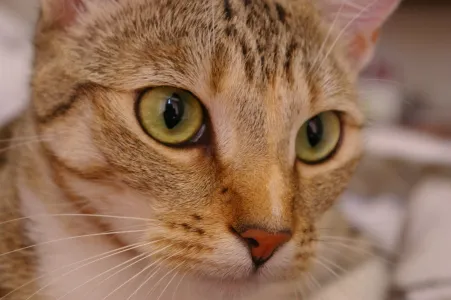
The orange fur, green eyes and head angle remain recognizable. The eyes are more expressive and individual hairs are stylized.
BEFORE AND AFTER
Photo to cartoon examples
For measured pet gifts and the remaining limits of coloring pages, see our photo editing use cases.
Original photos and actual AI outputs. Compare the interpretation, then open the generation details to see the prompt, model and source. The same photos ran through three models in our image to image AI test.
BEFOREAI RESULT
Chelsea the cat
The orange fur, green eyes and head angle remain recognizable. The eyes are more expressive and individual hairs are stylized.
Generation details and image source
Model: gpt-image-2. Generated: 2026-11-10. Result shown without retouching.
Prompt: Transform this photo into a colorful 2D cartoon illustration. Preserve the main subject, proportions and recognizable composition. Use clean expressive outlines, simplified shapes and flat colors with gentle cel shading. No text, logos or watermark.
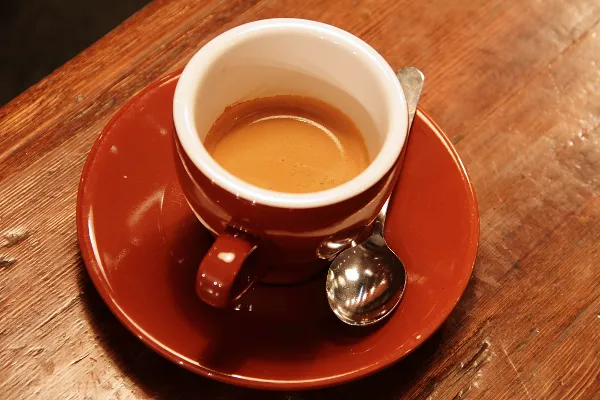
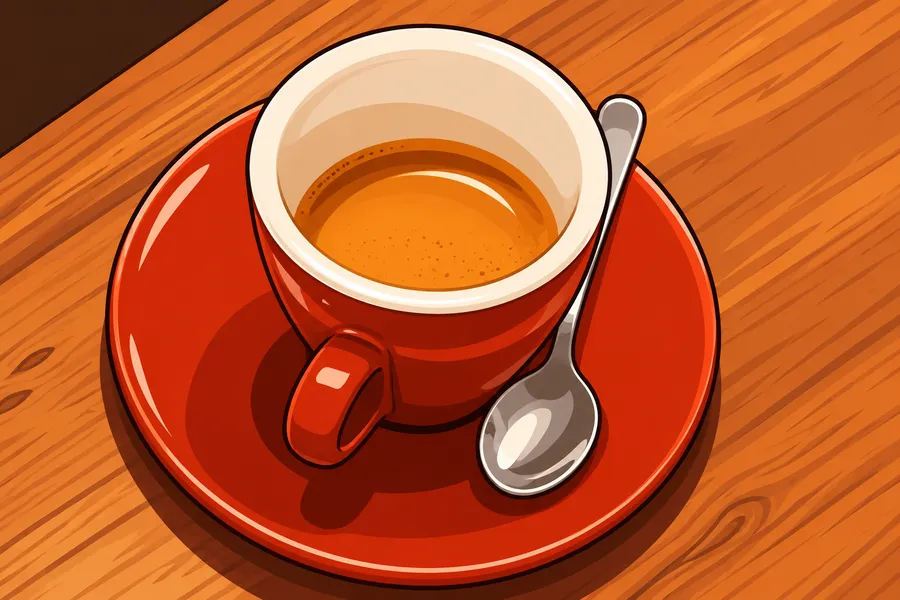
The red cup, spoon and wood tones remain recognizable. Reflections and small surface details are simplified into illustrated shapes.
Generation details and image source
Model: gpt-image-2. Generated: 2026-11-10. Result shown without retouching.
Prompt: Transform this photo into a colorful 2D cartoon illustration. Preserve the main subject, proportions and recognizable composition. Use clean expressive outlines, simplified shapes and flat colors with gentle cel shading. No text, logos or watermark.
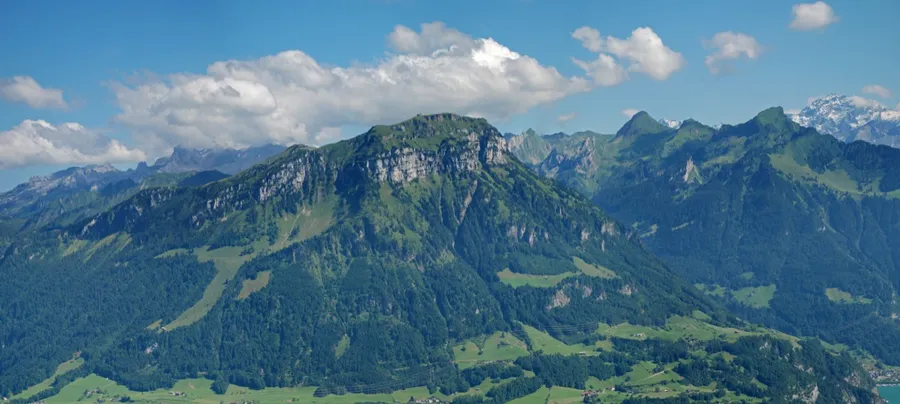
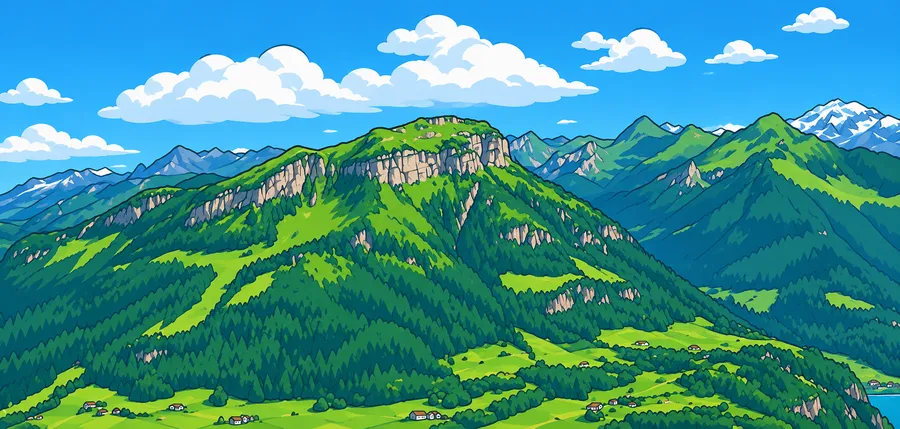
The main ridge and valley remain recognizable in bright flat colors. Clouds, forests and distant buildings are redrawn and simplified.
Generation details and image source
Model: gpt-image-2. Generated: 2026-11-10. Result shown without retouching.
Prompt: Transform this photo into a colorful 2D cartoon illustration. Preserve the main subject, proportions and recognizable composition. Use clean expressive outlines, simplified shapes and flat colors with gentle cel shading. No text, logos or watermark.
Cartooning simplifies shapes, so the subject needs a clear silhouette against its surroundings. In the mountain example, clouds, forests and buildings were redrawn and simplified; ask for a simpler background when the subject matters more than the scene.
Likeness after simplification
Simplified features change faces most. The cat example kept its orange fur, green eyes and head angle, but the eyes became more expressive. Check eyes, hair and expression before using a cartoon as a profile image.
Markings, colors and small objects
Pet markings, collars, logos and reflections are often reduced to flat shapes, as with the coffee cup example. Name any marking or color that must stay in the optional notes.
Start with a clearly visible person, pet or scene. One prominent subject and good lighting usually give the AI a clearer starting point.
STEP 02
Pick an illustration direction
Choose flat illustration, comic book or soft storybook. Add a short instruction for background or color preferences if needed.
STEP 03
Compare the interpretation
Check the face, pose and any important objects. Generate another version to try a different direction, then download the result you prefer.
IDEAS TO TRY
Cartoon ideas for portraits, pets and scenes
A clean illustrated portrait
Flat illustration asks for simple shapes and clear color areas. It can suit an avatar idea, though exact facial identity is not guaranteed.
A vivid comic-style pet
Comic book asks for bold contours, graphic shadows and halftone texture. Review eyes, paws and collars after generation.
A gentle storybook scene
Soft storybook asks for hand-painted colors and rounded forms. It may simplify crowded backgrounds or change small scene details.
WHAT TO EXPECT
Limits of an AI cartoon: likeness and consistency
The AI redraws your subject in an illustrated style. Exact identity, anatomy, pose and background structure are not guaranteed.
The three directions describe visual properties rather than a named artist or franchise. Results can vary between generations.
This creates a still raster image. It does not animate a character, create vector layers or guarantee consistency across a series.
PRICING
Start with 2 credits, then pay once for more
GPT Image 2 uses 1 credit per image; Nano Banana 2 uses 3. Failed generations are refunded automatically. Comparing and downloading existing results are free.
STARTER PACKONE-TIME
$9.99/ 60 credits
Enough to try plenty of ideas on your photos. Pay once; there is no subscription.
60 credits, about 17¢ each
Every tool, including AI room design
Any prompt, any photo
Purchased credits never expire
Failed images refunded automatically
Private to your account
VALUE PACKBEST VALUE
$19.99/ 200 credits
For bigger projects and lots of versions, at the lowest price per credit.
200 credits, about 10¢ each
Everything in the Starter Pack
Room to try many versions of each photo
Purchased credits never expire
Failed images refunded automatically
Every new account starts with 2 free credits, which expire after 30 days. Prices in USD; taxes may apply. Secure checkout by Stripe.
FAQ
Photo to cartoon: questions and answers
How do I turn a photo into a cartoon?
Upload a photo, choose one of the three cartoon directions and generate. Compare the illustrated result with your original. You can change the direction and generate another version from the same photo.
How are the cartoon directions different?
Flat illustration asks for clean outlines and minimal shading. Comic book asks for bold contours, vivid colors and graphic shadows. Soft storybook asks for gentle rounded forms and hand-painted colors. They are generation directions, not fixed filters.
Can I cartoon a pet or a landscape?
Yes. The tool accepts more than portraits. Choose a clear main subject, and expect fur, foliage and small background details to be simplified or reinterpreted.
Will I look exactly the same?
No exact likeness is guaranteed. Cartooning simplifies features and can alter eyes, hair, expression or proportions. Compare the result before using it as a profile image or sharing it with someone else.
Is this an anime or animation generator?
These presets are flat illustration, comic book and soft storybook. They create one still image. The tool does not animate your photo or guarantee the appearance of a particular franchise or character.
How can I make a cartoon of myself for free?
Upload a clear, well-lit photo of yourself, choose a cartoon direction and generate. New accounts with a verified email or phone number get 2 free credits, which expire 30 days after sign-up; each version uses 1 credit with GPT Image 2 or 3 with Nano Banana 2. Cartooning simplifies your features, so the result may not look exactly like you. Compare it with your photo before using it as an avatar.
Try another way to restyle your photo
See every tool with a real example on the AI photo styles page, or go straight to another style.
 BEFOREAI RESULT