This image to image AI test ran three models on the same three photos with the same prompts: Flux Kontext Pro, Nano Banana 2 and GPT Image 2. Each model made one coloring page, one pencil sketch and one cartoon, once each, on 2026-11-10. GPT Image 2 kept the subject and reached the target style in all three scenarios at the lowest cost, so it became the default model for general photo edits on Image to Image AI. It was also the slowest. Nine screening images are a small sample, so read the result as a first comparison, not a long-term benchmark.
Disclosure: Image to Image AI runs this site and ran this test. The result decided which model our own tools use, so we have an interest in it. Every result below comes from a saved model output, and each limitation we recorded is listed. WebP display copies are resized and compressed; the original output files are retained.
Which model did the test favor, and why?
GPT Image 2 kept the subject and reached a presentable version of the target style in all three scenarios, and it was the cheapest of the three. It cost $0.0085 per image, against $0.032 for Flux Kontext Pro and about $0.054 for Nano Banana 2. The trade-off was waiting time: GPT Image 2 took 33.92–55.17 seconds in the screening runs, compared with 18.62–21.86 seconds for the other two.
On Image to Image AI, the general editor and the photo to coloring page converter, sketch and cartoon tools now use GPT Image 2 by default. The AI room design tool was not part of this style test. A separate three-room check on November 11, 2026 also selected GPT Image 2 for room redesign and staging. Room details can still change; these results are design concepts, not architectural plans.
This conclusion only covers the three scenarios below. It says nothing about faces, text, product photos, room photos or other edits we did not run.
How was the test set up?
The test used three fixed scenarios, one run per model, with identical input bytes and identical prompts. Nothing was rerun to get a better-looking image, and no prompt was rewritten after a weak result.
- Date: 2026-11-10.
- Scenarios: cat → coloring page, coffee cup → pencil sketch, mountain panorama → 2D cartoon.
- Runs: 9 screening images (3 models × 3 scenarios), then 6 more GPT Image 2 images to complete every photo-and-style pair on the tool pages. That is 15 submissions, 15 successes, 0 failures and 0 resubmissions.
- Access: all three models were called through APIMart's asynchronous image API. The model names are APIMart's; we did not independently verify the underlying model provider.
- Settings: single image per request. The cat and coffee runs asked for 3:2, the mountain run for 21:9. Flux Kontext Pro returned about 1 megapixel natively; Nano Banana 2 and GPT Image 2 used their 1K tier. Output pixel sizes therefore differ, so this is not a strict pixel-for-pixel match.
- Seed: not fixed. The same request run again may produce a different image.
- Timing: the recorded time includes submission, polling every 5 seconds and download. It is not pure inference time.
- Review: one reviewer, an AI coding agent (Codex), inspected each image for a recognizable subject, the target style, rewritten details and, for coloring pages, open white areas. It was not a blind review, there was no user-preference vote, and we gave no numeric scores.
Input photos and licenses
| Input | Source and author | License | Preparation |
|---|---|---|---|
| Chelsea the cat | scikit-image sample data, Stefan van der Walt | CC0 1.0 | Original 451×300 PNG, bytes unchanged |
| Coffee cup and spoon | scikit-image sample data, Rachel Michetti / Pikolo Espresso Bar | CC0 1.0 | Original 600×400 PNG, bytes unchanged |
| Fronalpstock panorama | Wikimedia Commons file page, Hannes Röst | CC BY-SA 3.0 | Resized proportionally to 1200×539 JPEG; no crop or retouching |
The mountain outputs are AI adaptations of a CC BY-SA 3.0 photo and are shared under the same license. The original outputs were not cropped, redrawn, sharpened or cleaned up and retain the downloaded model bytes. The page displays resized WebP copies for faster loading; these are not byte-identical to the originals.
Prompts
Every model received the same prompt for a scenario:
- Coloring page: “Convert this photo into a printable black-and-white coloring page. Preserve the main subject and recognizable composition. Use clean bold closed outlines on a pure white background, large open areas for coloring, no shading, no grayscale, no solid black fills, no text or watermark. Simplify small background details.”
- Pencil sketch: “Turn this photo into a graphite pencil sketch on white paper. Preserve the main subject, proportions and recognizable composition. Use natural hand-drawn pencil lines and subtle crosshatching, grayscale only, no color, no added objects, no text or watermark.”
- Cartoon: “Transform this photo into a colorful 2D cartoon illustration. Preserve the main subject, proportions and recognizable composition. Use clean expressive outlines, simplified shapes and flat colors with gentle cel shading. No text, logos or watermark.”
What each image cost
These are the amounts the provider charged per image, read from each task's reported cost. They are not the price users pay; on Image to Image AI, GPT Image 2 uses 1 credit per image and Nano Banana 2 uses 3.
| Model | Cost per image in this test | Screening time |
|---|---|---|
Flux Kontext Pro (flux-kontext-pro) | $0.032 on all three images | 18.82–20.59 s |
Nano Banana 2 (nano-banana-2, official channel) | $0.053998–$0.054006 | 18.62–21.86 s |
GPT Image 2 (gpt-image-2) | $0.0085 on all nine images | 33.92–55.17 s |
The 9 screening images cost $0.283504 and the 6 follow-up GPT Image 2 images cost $0.051, for a total of $0.334504. An earlier one-off Flux smoke test cost a further $0.032 and is not part of this comparison.
Results: cat photo to coloring page
None of the three coloring pages fully followed the prompt. GPT Image 2 gave the clearest regions for coloring, but, like Flux Kontext Pro, it kept solid black pupils despite “no solid black fills”.
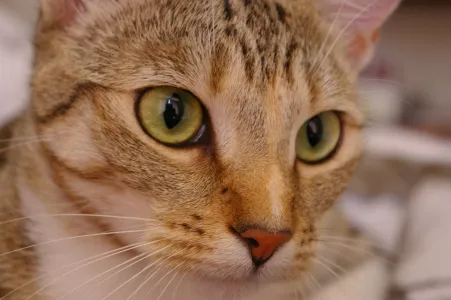 Input photo
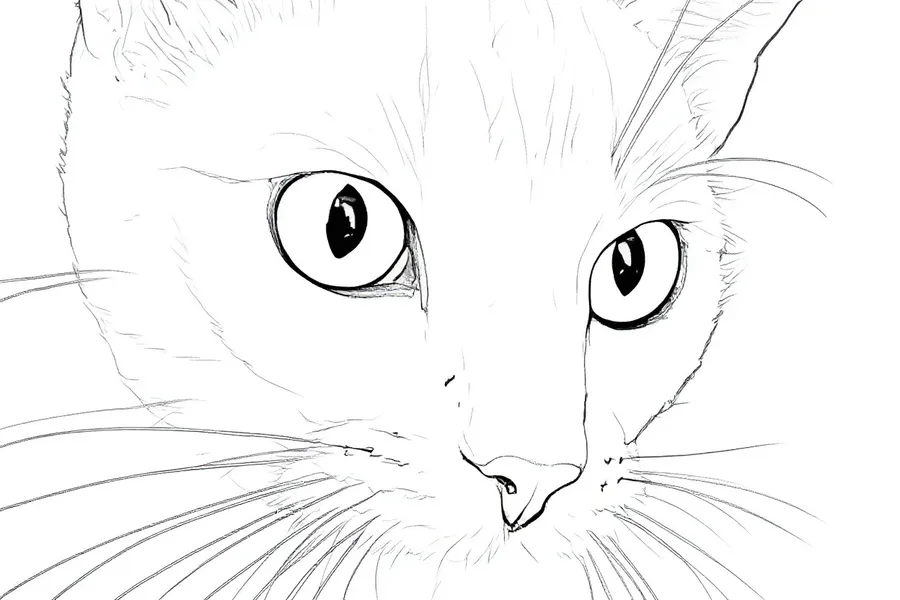 Flux Kontext Pro · $0.032 · 18.82 s
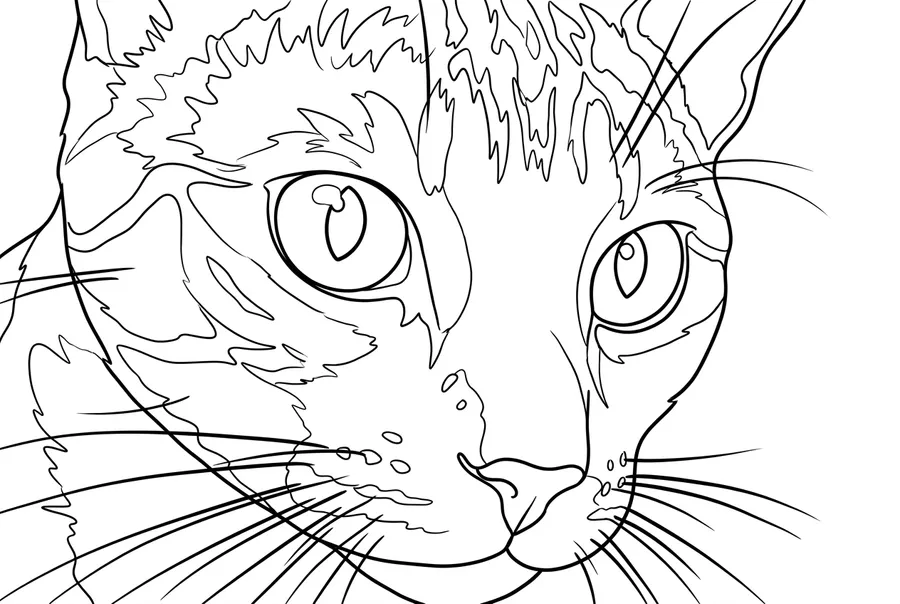 Nano Banana 2 · $0.054006 · 19.09 s
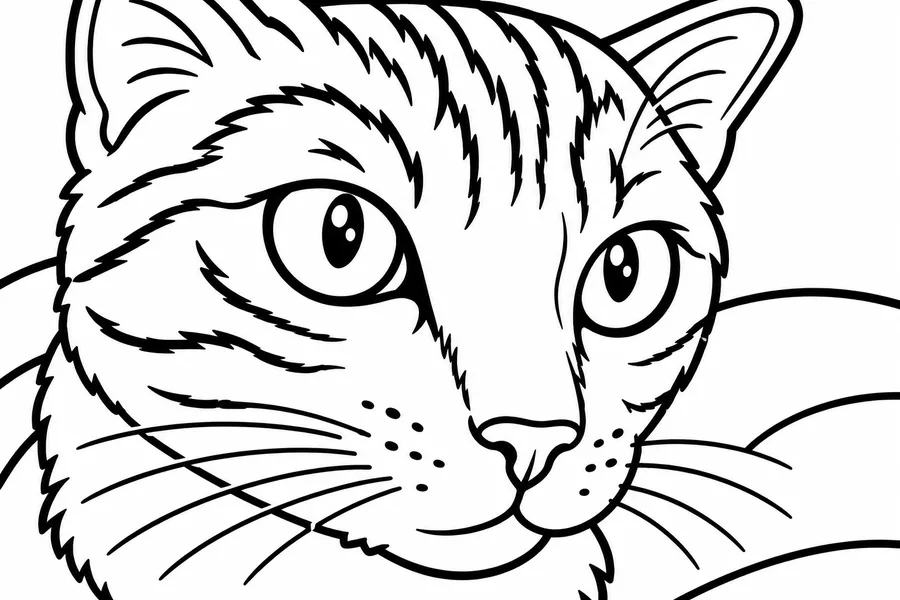 GPT Image 2 · $0.0085 · 33.92 s
- Flux Kontext Pro: large white areas, but the fur lines are thin with many breaks, and the pupils stay solid black. It reads more like a line sketch than a coloring page.
- Nano Banana 2: continuous lines and rich fur texture, but the forehead has many small fragmented regions.
- GPT Image 2: a clear subject with bold outlines and regions that are easy to pick out. It kept solid black pupils, so it did not fully meet the “no solid black fills” instruction.
Results: coffee photo to pencil sketch
All three sketches kept the cup, saucer and spoon. They differed in how much of the coffee and the table survived, and how heavy the shading became.
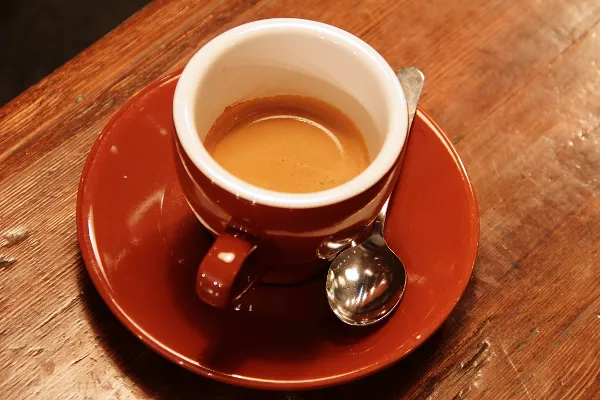 Input photo
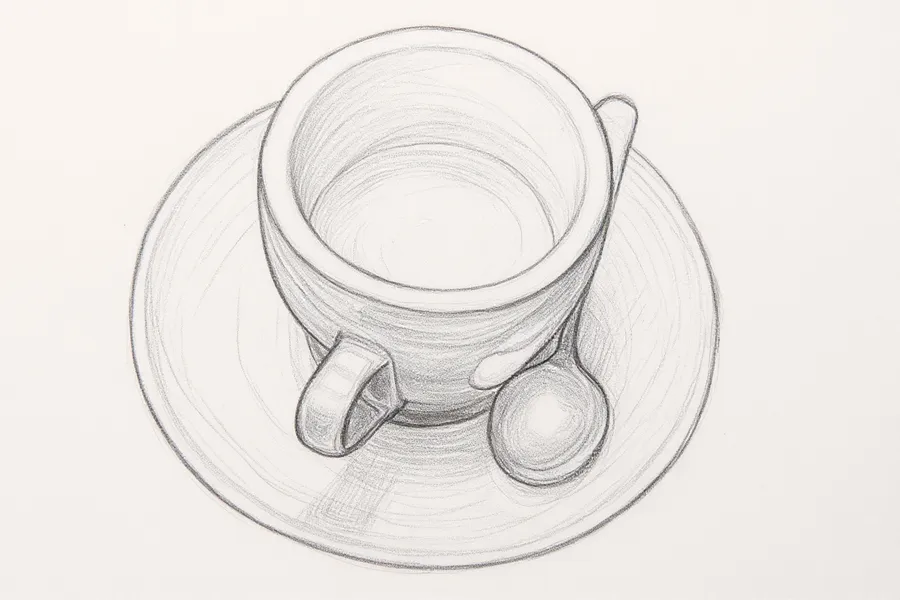 Flux Kontext Pro · $0.032 · 19.22 s
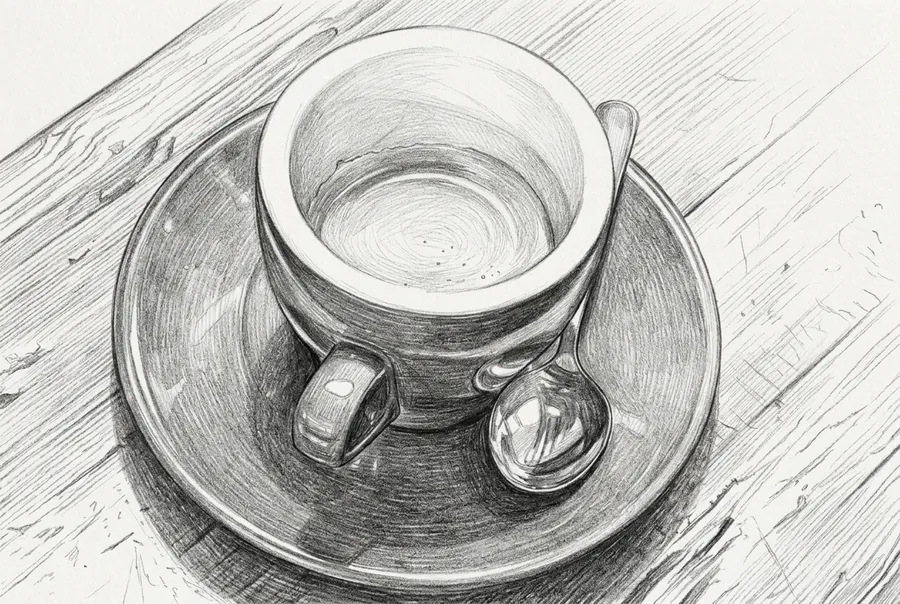 Nano Banana 2 · $0.054000 · 21.86 s
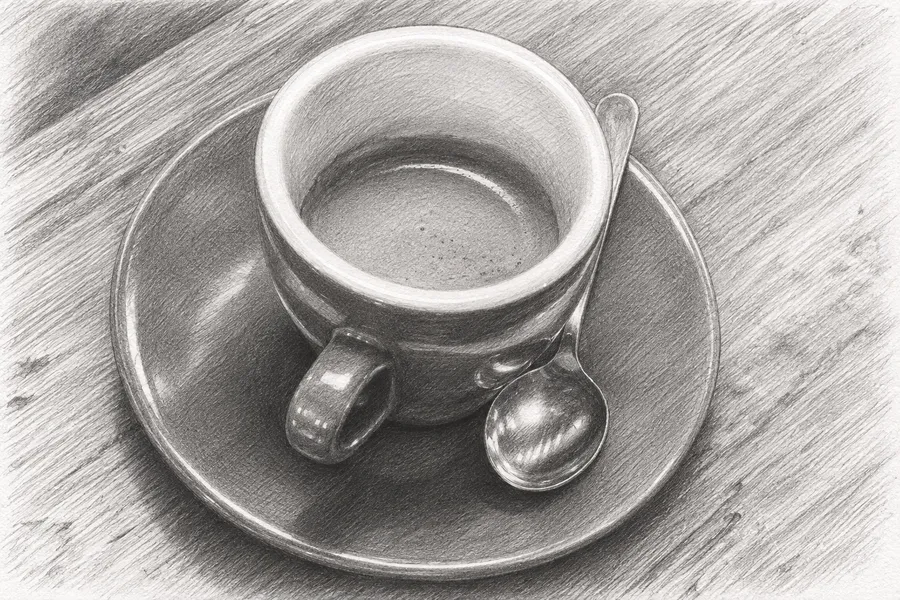 GPT Image 2 · $0.0085 · 55.17 s
- Flux Kontext Pro: the cup, saucer and spoon keep their positions, but the table texture is weakened and the coffee left in the cup is hard to see.
- Nano Banana 2: good texture and sense of space, but the shadows are heavy and the reflection details were redrawn.
- GPT Image 2: the leftover coffee, cup rim, spoon and table are all clear. The texture is dense, so lines may merge when the sketch is printed small.
Results: mountain photo to cartoon
All three models kept the mountain ridges recognizable. Each one also rewrote some part of the scene, so none of these cartoons is a faithful record of the place.
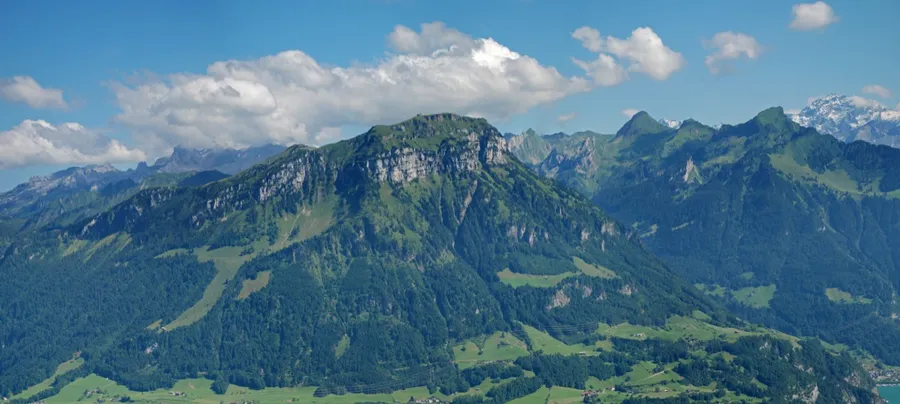 Input photo
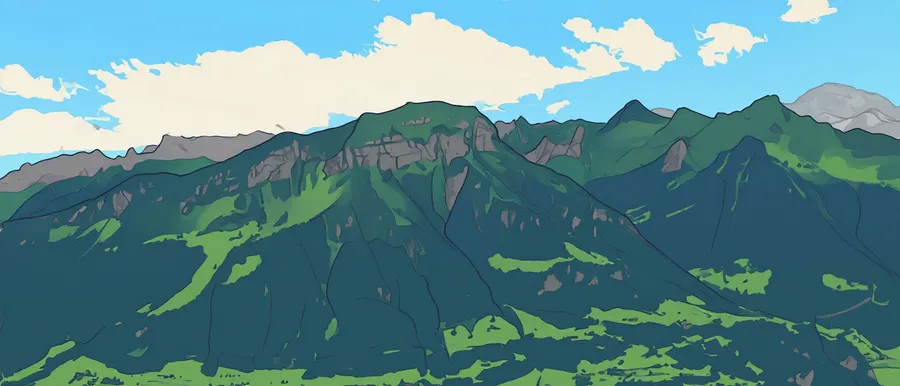 Flux Kontext Pro · $0.032 · 20.59 s
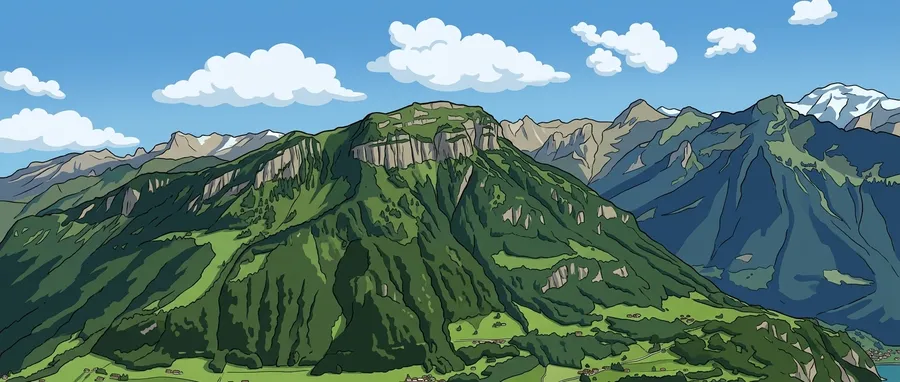 Nano Banana 2 · $0.053998 · 18.62 s
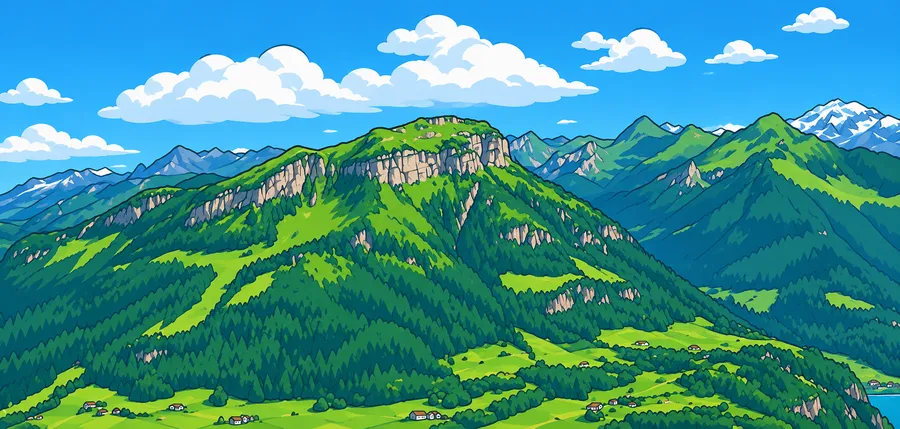 GPT Image 2 · $0.0085 · 35.62 s

- Flux Kontext Pro: the ridge positions are recognizable, but the foreground layers and small buildings are weakened.
- Nano Banana 2: clear layers and moderate simplification, but the clouds were redrawn.
- GPT Image 2: clear color blocks and layers, with the main ridges kept. The clouds, forests and small buildings were redrawn.
What did we learn from the image to image AI test?
Every model missed part of a prompt or rewrote a detail in at least one scenario. The practical lesson is to check outputs against the original, not to trust any one model to follow a prompt exactly.
A “no” in the prompt is not a guarantee. Two of the three models kept solid black pupils on the cat after being told “no solid black fills”. If you need a strict result, inspect it and revise the prompt; our guide on how to edit photos with AI prompts covers naming one change and what to preserve.
Coloring pages still need a print check. Among the six follow-up GPT Image 2 images, the coffee coloring page left a few outlines open and the mountain one had ridge lines that did not form closed regions. The coloring page tool shows those examples next to their notes, so check closed shapes before printing.
Dense detail is a print-size question. The GPT Image 2 sketches kept a lot of texture, and the cat sketch's fine pencil marks may merge in a small print. When you turn a photo into a sketch, view the result at the size you plan to print.
Cartoons redraw small things. Clouds, trees and buildings changed in every mountain cartoon. If those details matter, compare carefully when you turn a photo into a cartoon.
Generated detail is invented, not recovered. That applies to every model here, which is why our explainer on what image to image AI is treats outputs as new images rather than restorations.
The cheapest model was not the fastest. GPT Image 2 cost the least in this run but took the longest, and its slowest image in this run took 55.17 seconds.
To try the same kind of edit on your own picture, upload it to the image to image AI photo editor and compare the result with the original.
Frequently asked questions
Which model was best in this image to image AI test?
GPT Image 2 was chosen because it kept the subject and reached the target style in all three scenarios at the lowest cost, $0.0085 per image. It was not flawless: it kept solid black pupils on the coloring page and redrew clouds, forests and small buildings in the cartoon. With one run per scenario and no blind review, this is not proof that it is better in general.
Why was GPT Image 2 slower?
We did not investigate the cause. The recorded times include submission, polling every 5 seconds and download, and GPT Image 2 took 33.92–55.17 seconds in screening against 18.62–21.86 seconds for the other two models. Across all nine GPT Image 2 images, times ranged from 28.23 to 55.17 seconds.
Did any generation fail?
No request failed: all 15 submissions succeeded and none were resubmitted. That describes this one run only and is not a production success rate. Several outputs did miss parts of their prompt, as listed in the results above.
Can I reuse the images on this page?
The cat and coffee inputs are CC0 1.0 from scikit-image. The mountain input is by Hannes Röst on Wikimedia Commons under CC BY-SA 3.0, and the mountain outputs are adaptations under the same license, so credit the author and link the license if you reuse them.
Will I get the same output if I run the same prompt?
Not necessarily. The seed was not fixed, so the same photo and prompt can produce a different image on another run.
Read more
How to Edit Photos With AI: A Prompt-by-Prompt Workflow
How to edit photos with AI: upload a clear photo, describe one change, say what must stay, and compare versions. Includes AI photo edit prompts to copy.
What Is Image to Image AI? A Practical Guide
What is image to image AI? Learn how it edits a photo you already have, how it differs from text to image and filters, and how to start with a prompt.